

In the field of email marketing, analyzing the performance of your campaigns is essential to optimize your strategies, maximize engagement, and improve return on investment (ROI). Key Performance Indicators (KPIs) play a central role in this process. Here are the main KPIs to monitor and how to interpret them to make the most of your emailing software.
Key KPIs of an emailing campaign
Deliverability is a key KPI for evaluating the performance of your email campaigns.
It serves as the foundation for all other metrics you will analyze later on. While it may lack precision in certain cases, it provides a useful estimate of the effectiveness of your sends and helps identify newsletters that may not have reached subscribers’ inboxes.
It is generally recommended to maintain a deliverability rate above 95%, which reflects a high-quality database and an effective sending strategy. Like the bounce rate, deliverability is a reliable tool to assess the health and relevance of your contact list.
1. Deliverability Rate
What is it?
The deliverability rate represents the percentage of emails successfully delivered to recipients’ inboxes, without being blocked by spam filters or technical errors.
Why is it important?
Deliverability is the foundation of all other metrics, as emails must first reach the inbox to generate engagement or conversions.
Best practices to improve deliverability:
- Visible unsubscribe link
- Clean, quality recipient lists
- Proper email authentication
For more, read our full article on Email deliverability best practices
2. Open rate
What is it ?
The percentage of recipients who opened your email.
Why is it important ?
It reflects the effectiveness of your subject line and sender identity.
Best practices :
- Write compelling personalized subject lines
- Test different send times
- Use a trustworthy sender name
Note : Be aware that this rate may be skewed by the privacy options introduced with iOS 15. These features directly impact open rates on Apple devices. If users have enabled the option to prevent tracking of their activity, email opens are no longer trackable. In the United States, only 4% of Apple users are estimated to have allowed activity tracking, a very low percentage that makes it difficult to accurately monitor actual opens.
With the changes in iOS 15, open rate has become a less relevant metric for marketing teams. But this isn’t the only reason. From a technical perspective, an open is only recorded when the images in the message are downloaded. However, many users block this download, which skews the measurement of this KPI. It is therefore preferable to focus more on metrics such as click-through rate and engagement rate.
3. Click-Through Rate (CTR)
What is it?
The percentage of recipients who clicked on a link in your email.
Why is it important?
It measures engagement and the effectiveness of your CTAs (calls to action).
Best practices:
- Clear and visible CTA’s
- Relevant, segmented content
- Test different formats
4. Click-to-Open Rate (CTOR)
What is it?
The percentage of recipients who clicked on a link out of those who opened the email.
Why is it important?
It reflects how engaging and relevant your content is. Unlike open rates, CTOR is a more accurate indicator of true engagement.
Best practices:
- Ensure alignment between subject and content
- Send follow-ups (e.g, J+2, J+7) to catch missed opportunities
- Use urgency in promotions (“Only 24h left”…”)
5. Conversation rate
What is it?
The percentage of recipients who completed the desired action (purchase, registration, download, etc.).
Why is it important?
It directly measures the impact of your campaigns on business objectives.
Best practices:
- Optimize landing pages
- Personalized offers
- Ensure email site consistency
6. Unsubscribe rate
What is it?
The percentage of recipients who unsubscribed after receiving your email.
Why is it important?
A high rate indicates poor relevance or excessive frequency.
Best practices:
- Segment your lists for relevancy
- Offer adjustable frequency options
- Track reasons for unsubscribes
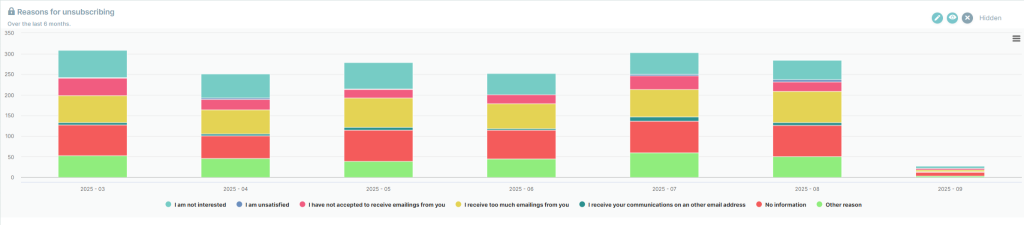
→ Probance recommends tracking the reasons for your customers’ unsubscribes.
By analyzing the most frequently cited reasons, you will be able to address problem areas and improve your communication strategies. Whether it’s by adjusting your content, sending frequency, or overall approach, the data collected gives you the power to act strategically. This proactive approach not only presents an opportunity to enhance your deliverability but also strengthens your relationship with your customers.
→ How can you track this metric?
You can now find a report containing your customers’ unsubscribe reasons in your reporting under “My Contact Base.”
7. Bounce Rate
What is it?
The percentage of emails that were not delivered.
Why is it important?
A high bounce rate can damage your deliverability and indicates invalid or outdated contacts.
Best practices:
- Use double opt-in
Validate email addresses
Regularly clean your list
8. ROI (Return on investment)
What is it?
Revenue generated compared to campaign costs.
Why is it important
It determines whether your campaigns are profitable.
Best practices:
- Analyze top performing campaigns
- Invest in personalization & automation
- Adjust strategies bases on data
Where to track these in Probance One?
In the Analysis BI section, you’ll find the different performances by scenario, newsletter, A/B test and API campaign.
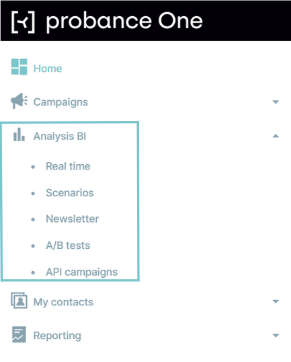
You can access the results of your different communication channels:
- Campaigns sends
- Open rate
- Click rate
- Conversion rate etc…
For deeper insights, click “Details” for each campaign, or export CSV files.
Our advice : Don’t forget to consult the heatmap to see which areas of your emails are clicked on the most – an excellent way of optimising your future campaigns! To find out more, watch our short video: How to view the heatmap of a campaign?
Customer data
- Email addresses: total contacts
- Opt-ins: number of consented contacts
- New sign-ups: addresses collected in a given period
Behavioral Data
- Time since last click
- Time since last purchase
- Purchase frequency
Where can you track them in Pone?
In the Dashboard section, seven dashboards are available by default to enable you to track the key indicators linked to your contacts, campaigns, revenues and deliverability. You can also create your own dashboards to set up analysis tools tailored to your objectives and your organisation.
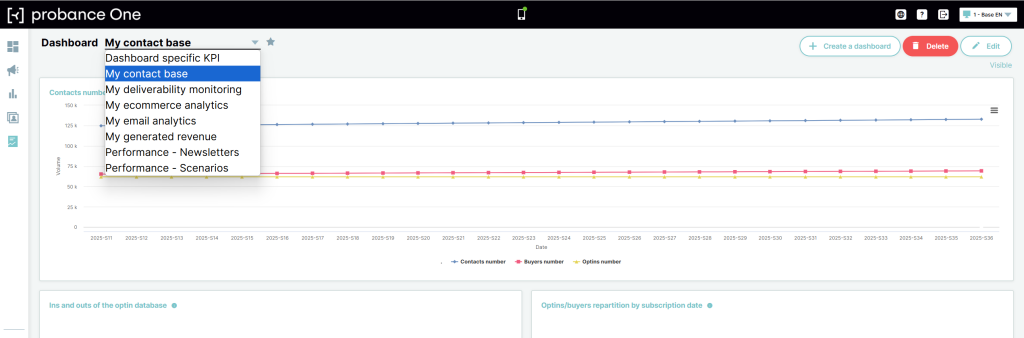
Need an introduction to basic dashboards? Read our tutorial: Introduction to dashboards Introduction aux dashboards
Key revenue indicator KPI’s
Your database isn’t just a file of contacts. It’s a revenue driver.
Here are the key indicators to monitor:
ROI (Return on Investment): measures the profitability of your campaigns and automated scenarios.
Revenue per campaign: sales generated by each mailing (email, automation, etc.).
Average purchase amount: average post-campaign shopping basket, useful for assessing the impact of emails on conversion.
Attribution methods: how to link your revenues to your campaigns?
Probance offers several models to measure the impact of your communications on your sales:
1. Last campaign attribution
Attributes 100% of the transaction to the last eligible campaign received by the contact before their purchase.
2. Global attribution
Distributes the revenue from a transaction equally between all the eligible campaigns (scenarios + newsletters) that preceded the purchase.
3. Direct attribution
Allows you to measure the impact of scenarios and newsletters separately, by attributing revenue only to campaigns of the same type as the one that triggered the conversion.
Where can I track them in Pone?
The Generated Revenue dashboard provides a detailed view of the commercial performance of your business. It enables you to analyse changes in revenue generated, identify the main components and gain a better understanding of the profiles behind the transactions. This dashboard is particularly useful for monitoring the profitability of your marketing actions, and refining your strategies for building customer loyalty, relaunching or winning new customers on the basis of actual revenue data.
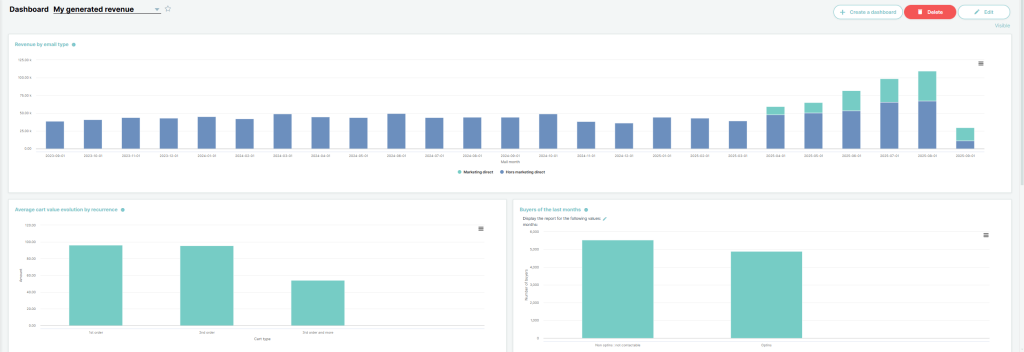
👉Watch our video:
– How to interpret the different dashboards?
Standard reports included at setup
From project launch, Probance provides ready-to-use reports to track your activity.
These dashboards give you a clear view of your automated scenarios and newsletters.
You can also automate distribution via scheduled reports, sent directly to designated recipients, even non-users.
Watch our video: How to schedule and automate reports in Probance One
How to access the results of your newsletters and scenarios?
All the performances are available in your Probance One space, in a simple and intuitive way, to help you analyse the impact of your campaigns and continuously improve your results.
👉 Find out all the details in our videos :
– How to access the results of my newsletters?
– How to access the results of my scenarios?
Custom Reports for your business needs
1. Sky Tune Insight : for data experts
Advanced querying of your CDP with SQL:
✅Access clients, products, campaigns, recommendations
✅ Perform simple or complex analyses
✅ Export to BI/reporting tools
✅ Create advanced targeting
✅ Build custom reports directly in Probance One
An asset for teams who want to gain greater autonomy, personalise their reporting and refine their targeting strategies.
2. No Data Team? No Problem
Our experts can create custom reports tailored to your goals.
Examples :
- Unsubscribe reports to spot retargeting opportunities
- Opt-in segmentation by purchase frequency for promotional/fidelization campaigns
Service cost: 5 credits. Contact your account manager if you need custom data.
Now it’s your turn to take action!