
Probance One allows you to track the revenue generated by your scenarios and newsletters, broken down into 3 contribution modes: last contact contribution, overall contribution, and direct contribution. Each mode affects the revenue generated by your contacts in the scenario and newsletter campaigns according to specific rules.
This tutorial will explain how to interpret the different contribution modes.
1. Income graphs
The scenario income graph is available in the menu Analysis BI > scenarios.
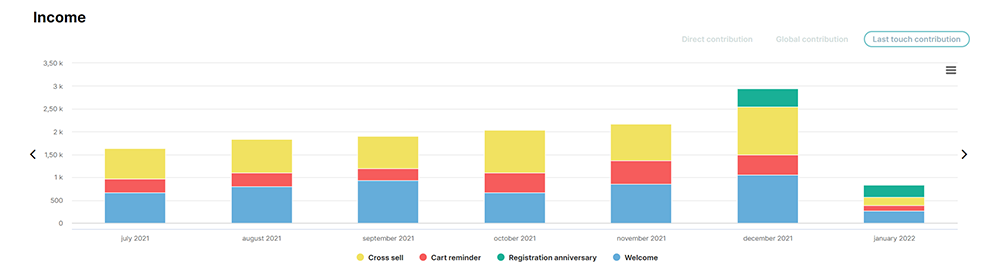
By default, the graph displays the distribution of income per scenario. The dropdown list at the top of the page allows you to display the performance within a scenario. Selecting a scenario will display a distribution of income per campaign within the scenario.
The newsletters income graph is available in the menu Analysis BI > newsletters. The graph displays a distribution of income per newsletter channel.
3 contribution modes are available for the income graph display:
- Last touch contribution
- Global contribution
- Direct contribution
Click on one of them to update the graph with the selected contribution mode.
2. Last touch contribution
The last touch contribution mode assigns each transaction registered by a contact to the last eligible campaign, only when the contact has been touched by a campaign in the last 15 days.
In general, the eligible campaigns are:
- emailing campaigns with an open in the 7 days before the transaction
- received SMS campaigns in the 7 days before the transaction
- notification campaigns with a click in the 7 days before the transaction
ProbanceOne will choose the campaign with the nearest action before the transaction and assign 100% of the CA to this campaign. The settings are define according to your business.
It is the contribution mode displayed by default by the income graphs in ProbanceOne.
3. Global contribution
The global contribution mode distributes the income of each transaction on every eligible campaigns, with the same ratio, and only when the contact received a campaign in the last 15 days before the transaction.
In general, the eligible campaigns are:
- emailing campaigns with an open in the 7 days before the transaction
- received SMS campaigns in the 7 days before the transaction
- notification campaigns with a click in the 7 days before the transaction
ProbanceOne will divide the transaction on all eligible campaigns, and the income is therefore split equally on the scenarios and newsletters.
Example: a contact generates an income of 300 with a transaction on D day. In the 7 days preceding the transaction, the contact opened the following emailing campaigns:
- 1 campaign from scenario A
- 2 campaigns from scenario B
- 1 newsletter C
- 1 newsletter D
The income will be split as follow:
- 60 (1/5 x 300) assigned to scenario A
- 120 (2/5 x 300) assigned to scenario B, 60 on each campaign of the scenario
- 60 (1/5 x 300) assigned to newsletter C
- 60 (1/5 x 300) assigned to newsletter D
4. Direct contribution
The direct contribution mode distributes the income separately between scenario campaigns and newsletters. The tracking needs that the contact received at least one campaign in the last 15 days.
First, each transaction is distributed between all the eligible scenario campaigns, and in general, the eligible campaigns are
- emailing campaigns with an open in the 7 days before the transaction
- received sms campaigns in the 7 days before the transaction
- notification campaigns with a click in the 7 days before the transaction
whatever the newsletters sent by ProbanceOne. This contribution is displayed in the scenarios performances and allows you to see the impact of scenario on your revenue and know the contribution of scenarios even if you wouldn’t do any newsletters.
Then, each transaction is distributed between all the eligible newsletter campaigns the contact, and in general, the eligible campaigns are
- emailing campaigns with an open in the 7 days before the transaction
- received SMS campaigns in the 7 days before the transaction
- notification campaigns with a click in the 7 days before the transaction
whatever the scenarios sent by ProbanceOne. This contribution is displayed in the newsletter performances and allows you to see the impact of newsletters on your revenue and know the contribution of newsletters even if you wouldn’t do any scenarios.
Example: a contact generates an income of 300 with a transaction on D day. In the 7 days preceding the transaction, the contact opened the following emailing campaigns:
- 1 campaign from scenario A
- 2 campaigns from scenario B
- 1 newsletter C
- 1 newsletter D
The income will be allocated as follow:
- 100 (1/3 x 300) assigned to scenario A
- 200 (2/3 x 300) assigned to scenario B
- 150 (1/2 x 300) assigned to newsletter C
- 150 (1/2 x 300) assigned to newsletter D
* Income distribution based on opens from the last 7 days is the default setting of Probance, but it can be set differently on your project.