

Why is deliverability important in email marketing?
Deliverability is crucial in email marketing because it determines the ability of emails to reach recipients’ inboxes, thereby increasing the chances of conversion and engagement.
- Reaching the inbox :
- Recipient engagement: Best practices ensure that your emails land in recipients’ inboxes and not in the spam folder, which increases the likelihood of them being opened and read.
- Optimizing conversion rates :
- Customer interaction : Emails that reach the inbox are more likely to be opened, leading to interactions such as link clicks, purchases, or sign-ups.
- Revenues : Good deliverability translates into higher sales and conversions, as your promotional messages and offers actually reach potential customers.
- Return on investment (ROI) :
- Campaign effectiveness : Investing in deliverability maximizes the return on investment of your email campaigns. Fewer emails landing in spam means more conversions per email sent.
- Resource efficiency : Good deliverability reduces wasted resources from sending emails that are never seen. This helps optimize the marketing budget.
- Sender reputation :
- Avoiding blacklists : Poor practices can lead to your domain or IP address being blacklisted, making it even harder to send future emails.
- Credibility : Following best practices helps maintain a positive reputation with email service providers, ensuring your emails continue to be delivered to inboxes.
Our Objectives
- Maintaining a strong reputation : We comply with ISP requirements and follow best practices to maximize the chances that your emails reach recipients’ inboxes and are not marked as spam.
- Providing proactive and personalized support : Our experts resolve technical blocking issues within one business day and assist you in cases of poor reputation. Our role goes beyond generic advice. For each issue encountered, we conduct an in-depth analysis and provide tailored recommendations.
In case of an incident, we contact Internet Service Providers (ISPs) and reroute traffic if necessary. - Ensuring compliance and security : We make sure your email address collection points are free from vulnerabilities and that your emailing practices comply with regulations, while safeguarding user data.
- Delivering precise analytics and customer support : We provide analytical tools to track campaign performance and technical support to help users optimize their email marketing efforts.

Best Practices for Email Deliverability
Email Authentication
- SPF (Sender Policy Framework), DKIM (DomainKeys Identified Mail), and DMARC (Domain-based Message Authentication, Reporting, and Conformance) are the three essential pillars for the authentication of your emails.
At Probance, SPF and DMARC records are configured with strict rules to ensure that only authorized IPs can send emails from your sending domains.
In addition, we use DKIM to digitally sign your emails and prove they have not been altered. This is an effective configuration to fight against spoofing, domain impersonation, and to maintain a strong reputation with your recipients.
If you delegate your domain to us, we handle the configuration and can adapt it as needed. If you do not delegate your domain, we provide you with the DNS records to add to your configuration, and you retain control to adjust them if necessary.
Recipient List
- Consent : Send emails only to recipients who have explicitly agreed to receive your communications.
- Regular cleaning : Regularly remove invalid or inactive email addresses to keep your list clean.
- Double Opt-In : Use double opt-in to confirm new subscribers’ registration and reduce incorrect addresses.
→ Check whether this option is available with your CMS.
Email Content
- Avoid spam words : Refrain from overusing words or phrases likely to trigger spam filters, such as “free”, “promotion”, or “click here”.
- Text/Image ratio : Maintain a good balance between text and images in your emails. Emails composed entirely of images are often flagged as spam.
- Alt tags : Use alt tags for images to describe their content, which improves readability and accessibility.
- Sender email address : Use a domain name that clearly identifies your company.
- Subject line : Write a short subject line that sparks curiosity while avoiding spam words.
- Preheader : Add a brief text in a few words to reinforce the subject line.
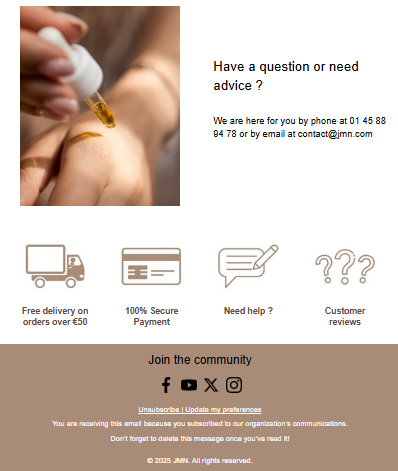
- Header : Include your company logo and links to unsubscribe and view the online version of the email.
- Footer : Highlight your social media links and customer service. Remind recipients why they are receiving the email (e.g., “You are receiving this email because you subscribed to our company’s communications”). Encourage them to delete the email after reading.
- Unsubscribe link : Ensure there is a clear and easy-to-use unsubscribe link, with a simple process in just a few clicks. If you have a communication preferences center, include a link to it as well.
Example email:

Personalization and Segmentation
- Personalization : Address your emails by the recipient’s name and adapt the content according to their preferences and behaviors.
Probance enables you to personalize your communications by including information from your customers’ profiles, such as their first name, last name, or birthday, in the messages you send them.
You can use these personalization fields, which are tags linked to this profile information. These tags can be inserted into your templates and subject lines, and they will automatically be replaced with each recipient’s specific data in the emails. This way, you can address every contact by their name, first name, or even include their registration date, birthday, and more.
To learn more:
Read our tutorial Personalizing your emails with customer profile information
- Segmentation : Segment your contact list to send targeted and relevant emails, thereby increasing engagement.
To learn more:
Read our tutorial Building a Campaign Target
Frequency and Timing
- Avoid excess : Don’t send too many emails to your subscribers. Find the right balance to maintain engagement without being intrusive. We recommend sending no more than one newsletter per week to each recipient.
- Optimal timing : Test and analyze the best times to send your emails in order to optimize open and click-through rates.
Note: Probance One takes personalization even further by automatically determining the optimal sending time for each contact who has already opened at least one of your emails, which is the time when the contact is most receptive and most likely to engage with your emails.
Technical Quality
- Responsive design : Make sure your emails are easily readable on all devices, including mobiles and tablets. Templates built with Fast Builder are responsive by default, with each block configured to adapt to the device on which it is viewed. Several options are available in our editor to control and optimize the display of your templates on mobile.
- Loading speed : Optimize images and code so your emails load quickly, even on slow connections.
- Preview testing : Use tools to preview your emails in different email clients before sending.
Unsubscription Management
- Visible unsubscribe link : Include a clear and easy-to-find unsubscribe link in every email. We recommend placing this link in both the header and the footer of your email template.
- Simple process : Make the unsubscribe process easy to prevent users from marking your emails as spam.
Increase in email sending
When sending your first newsletter via Probance, a controlled send increase is implemented by your project manager. This approach involves gradually sending the campaign, with a growing number of recipients at each stage, until the entire contactable base is reached.
- If your database contains more than 10,000 opt-in profiles, the newsletter is automatically duplicated to allow a staged increase in sending volume.
- This strategy prevents a sudden, large-scale send from being flagged as suspicious by email providers, which could result in emails being blocked or quarantined.
- It also helps to gradually build your sender reputation, a crucial factor in ensuring deliverability.
When scheduling your first newsletter, please inform your project manager: the send should take place on a weekday after 11 a.m., so that the deliverability team can provide optimal monitoring and intervene if necessary.
To further explore your first steps in deliverability with POne, we also invite you to read this article: “Introduction to Deliverability with ProbanceOne”.
Marketing pressure
Marketing pressure, that is, the frequency with which a single contact is exposed to your campaigns, directly affects your reputation. Excessive communication can lead to:
- unsubscribes,
- complaints (spam),
- a drop in engagement,
- a gradual deterioration of your deliverability performance.
Here are our recommendations:
- No more than one newsletter per week per recipient.
- No more than one newsletter per month to your entire contactable database.
- Focus on targeting active contacts rather than sending to the entire database.
- Gradually activate your automated workflows, prioritising those that generate the most value first: cart reminders, cross-sell campaigns, catalogue alerts.
Controlled marketing pressure means a better user experience, fewer complaint risks, and a healthier sender reputation.
Analysis and Monitoring
- Tracking indicators : Monitor open rates, click rates, bounces, and unsubscribes to evaluate your campaign performance.
- User feedback : Take into account feedback from your recipients to continuously improve your emails and their relevance.
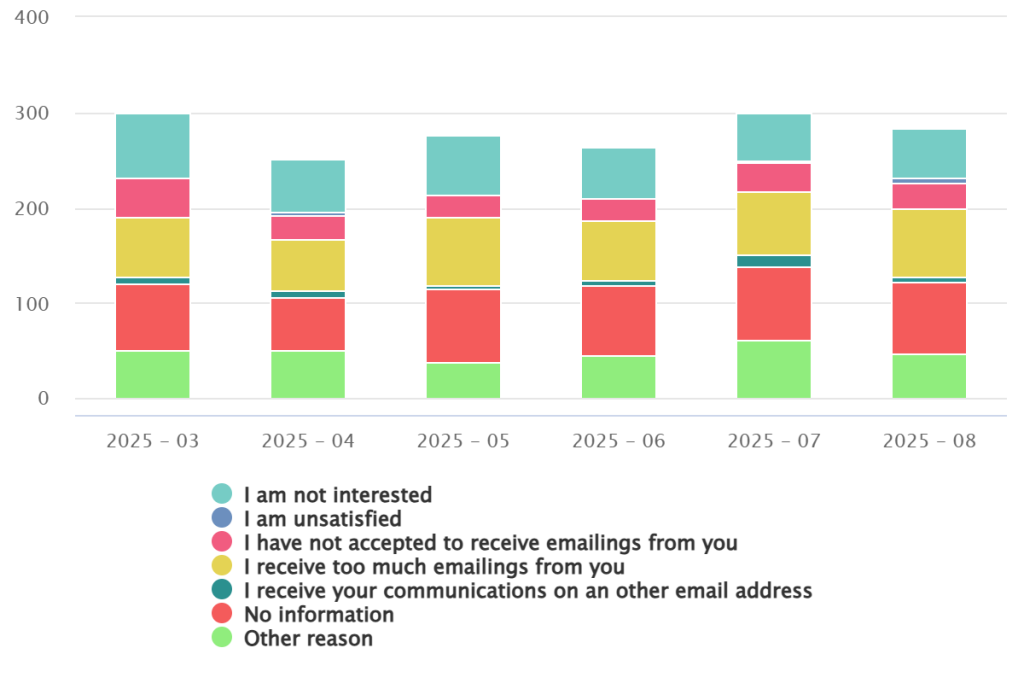
→ Probance recommends tracking the reasons why your customers unsubscribe.
By analyzing the most frequently cited reasons, you will be able to address weak points and improve your communication strategies. Whether by adjusting your content, sending frequency, or overall approach, the collected data empowers you to act strategically. This proactive approach not only creates opportunities to improve deliverability, but also strengthens your relationship with your customers.
→ How to track this indicator?
You can now find in your reporting, under “My contact base”, a report containing the reasons for your customers’ unsubscribes.
By applying these best practices, you will not only improve your email deliverability, but also increase engagement and customer satisfaction.
Focus on Address Collection: a Key Deliverability Challenge
Most websites have already been attacked or will be in the future. Bots massively register lists of addresses collected from the internet. Contacting these addresses is equivalent to sending spam (i.e., unsolicited emails), which results in a high number of complaints and rightly damages your reputation.
The quality of your opt-in database is essential. A database polluted with false addresses, for example those generated by bots, can lead to:
- an increase in bounces
- an artificially low engagement rate
- a loss of reputation with ISPs
- a long-term deterioration of your deliverability
We strongly recommend that you:
- Secure your sign-up forms with a system such as reCAPTCHA
- Regularly check the quality of the addresses collected
- Monitor unusual spikes in registrations (often a sign of an attack)
- Enable double confirmation (double opt-in) if your business allows it
Secure your collection points: the first line of defence
To limit fraudulent sign-ups and maintain the quality of your database, we recommend:
1. Strengthen sign-up forms
Requesting at least the first name, last name, and email address helps effectively limit automated sign-ups, as bots often struggle to correctly complete multiple consistent fields.
2. Implement a recent captcha
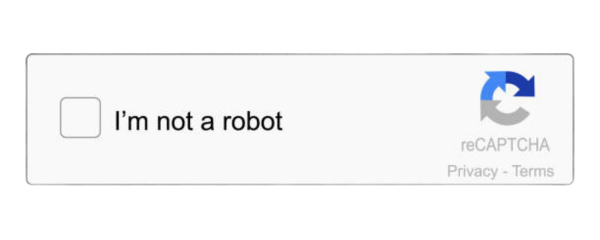
Installing a system such as reCAPTCHA v3 or hCaptcha on all your forms is now essential.
These solutions:
- are simple and quick to implement
- provide strong protection against automated sign-ups
- help maintain the quality of your opt-in database
3. Monitor anomalies
A sudden spike in registrations is often a sign of an automated attack. Regular monitoring allows you to quickly detect such suspicious behaviour.
4. Implement double opt-in (when applicable)
This additional step ensures that the entered address is genuine and belongs to an engaged user, thereby enhancing the quality of your database.
In summary, securing your collection points and monitoring the quality of your sign-ups are fundamental actions for maintaining optimal deliverability. A healthy database is and will remain one of the pillars of your email performance.
How to Track Deliverability in Pone
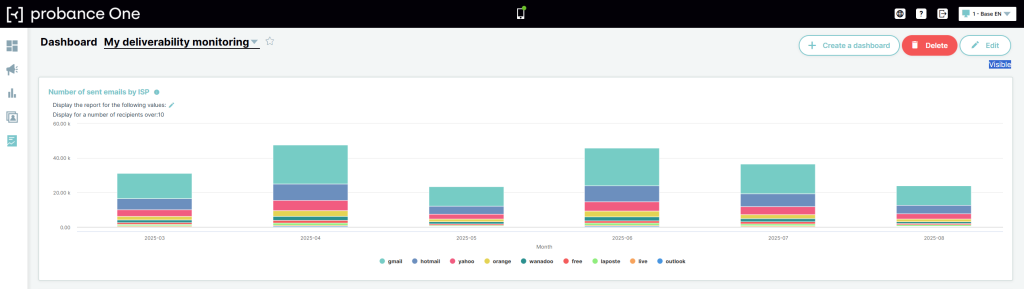
To track deliverability, you can consult the reports or dashboards in Probance One. Go to Reporting > Dashboard > My Deliverability Tracking.
It includes the following indicators :
• Send volume by email server (ISP)
• Opens by email server (ISP)
• List of the latest spam complaints
• List of the latest sign-ups
How to Detect a Deliverability Issue ?
There are several factors to consider :
- Monitor bounce and complaint rates : An unusually high bounce rate or an increase in spam complaints indicates deliverability problems. A high complaint rate may signal that your unsubscribe links are not visible, that your campaign is irrelevant (e.g., poor targeting), or that you have been attacked. Aim for fewer than 2 complaints per 10,000 emails sent.
- Analyze open and click rates : A sudden drop may indicate that your emails are being filtered as spam or are not reaching inboxes. Aim for a click rate of more than 2%.
- Check DMARC reports and blacklists : Authentication failures or being listed on blacklists are clear indicators of deliverability issues.
Need a Deliverability Audit?
Call on our expertise if:
✓ Your emails seem not to reach inboxes.
✓ You know there is a problem but cannot identify it.
✓ You have identified the problem but don’t know how to fix it.
✓ You are facing recurring blocks.
✓ You are adding or modifying IP addresses or domains.
Our deliverability specialists are ready to help ensure your emails reach every inbox.
The Benefits:
- Assessment of your sender reputation and recommendations to improve it.
- Identification and resolution of issues affecting your deliverability.
- Implementation of email deliverability best practices.
For any questions, contact your account manager.